
服务端部署
服务端系统版本
root@xxx:~# lsb_release -a
No LSB modules are available.
Distributor ID:Ubuntu
Description:Ubuntu 24.04.4 LTS
Release:24.04
Codename:noble
安装 Hysteria2
bash <(curl -fsSL https://get.hy2.sh/)

安装后会有:
可执行文件:/usr/local/bin/hysteria
systemd 服务:hysteria-server.service
配置目录:/etc/hysteria/
写 Hysteria2 服务端配置
把域名 vpn.example.com 的DNS解析到当前服务器
自己创建好域名的 HTTPS 证书
sudo mkdir -p /etc/hysteria
sudo tee /etc/hysteria/config.yaml >/dev/null <<'EOF'
listen: :443

tls:
  cert: vpn.example.com.crt
  key: vpn.example.com.key

auth:
  type: password
  password: "请改成超强随机密码"

masquerade:
  type: proxy
  proxy:
    url: https://www.cloudflare.com
    rewriteHost: true
EOF
注意证书的权限组
root@xxx:/etc/hysteria/certs# sudo systemctl cat hysteria-server
# /etc/systemd/system/hysteria-server.service
[Unit]
Description=Hysteria Server Service (config.yaml)
After=network.target

[Service]
Type=simple
ExecStart=/usr/local/bin/hysteria server --config /etc/hysteria/config.yaml
WorkingDirectory=~
User=hysteria
Group=hysteria
Environment=HYSTERIA_LOG_LEVEL=info
CapabilityBoundingSet=CAP_NET_ADMIN CAP_NET_BIND_SERVICE CAP_NET_RAW
AmbientCapabilities=CAP_NET_ADMIN CAP_NET_BIND_SERVICE CAP_NET_RAW
NoNewPrivileges=true

[Install]
WantedBy=multi-user.target

sudo chown -R hysteria:hysteria /etc/hysteria
sudo chmod 750 /etc/hysteria
sudo chmod 750 /etc/hysteria/certs
sudo chmod 640 /etc/hysteria/certs/fullchain.pem
sudo chmod 600 /etc/hysteria/certs/privkey.pem
放行防火墙端口
sudo ufw allow 443/udp
sudo ufw allow 80/tcp
sudo ufw allow 443/tcp
sudo ufw status

# Hysteria2 用的是 QUIC,核心是 UDP 443。
启动服务并设置开机自启
sudo systemctl daemon-reload
sudo systemctl enable hysteria-server
sudo systemctl restart hysteria-server
sudo systemctl status hysteria-server --no-pager

# 查看日志
journalctl -u hysteria-server -f
客户端使用
安装 Clash Verge
windows + MAC
https://github.com/clash-verge-rev/clash-verge-rev/releases

Android
https://github.com/MetaCubeX/ClashMetaForAndroid/releases

ios端
hiddfy,Shadowrocket等

订阅转换工具
V2ray订阅转clash订阅,clash订阅转v2ray,SSR,SS,v2ray,vless,trojan,hysteria2节点转换,在线本地订阅转换

订阅格式
hy2://password@xxx.xxx.cn:443/?insecure=0&sni=xxx.xxx.cn
导入配置
mixed-port: 7890
allow-lan: false
mode: rule
log-level: info
ipv6: true

dns:
  enable: true
  listen: 0.0.0.0:1053
  ipv6: true
  enhanced-mode: fake-ip
  nameserver:
    - 1.1.1.1
    - 8.8.8.8
  fallback:
    - 1.0.0.1
    - 8.8.4.4

proxies:
  - name: My-Hy2
    type: hysteria2
    server: vpn.example.com
    port: 443
    password: "你的强密码"
    sni: vpn.example.com
    skip-cert-verify: false

proxy-groups:
  - name: Proxy
    type: select
    proxies:
      - My-Hy2
      - DIRECT

rules:
  - DOMAIN-SUFFIX,linux.do,Proxy
  - DOMAIN-SUFFIX,google.com,Proxy
  - GEOIP,CN,DIRECT
  - MATCH,Proxy
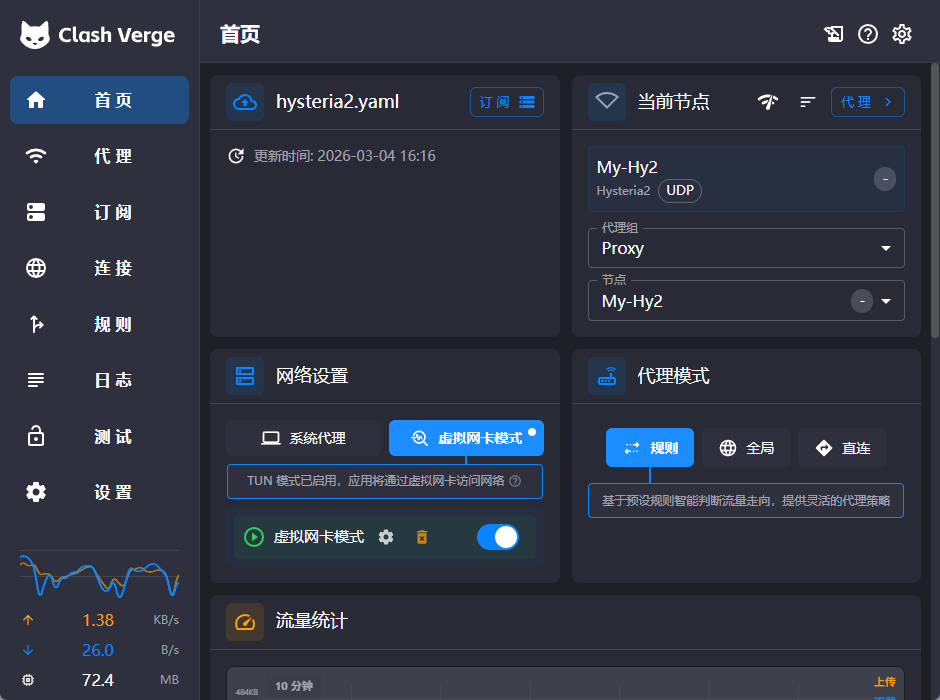
打开关键开关
打开 System Proxy(可选,给只走系统代理的软件用)
打开 TUN Mode(推荐,做全局分流)
Windows 下建议管理员运行,避免 TUN 权限问题